Google Business Profile Guide: Turning Searches into Calls and Directions
For a local business, Google Maps is the second shopfront. Here is how to set it up properly, with a real example of 11,658 interactions in six months.

Before most people visit a restaurant, clinic, store or coaching class, they search for it on Google. What they see there, your Google Business Profile, often decides whether they call, get directions or scroll to the next result.
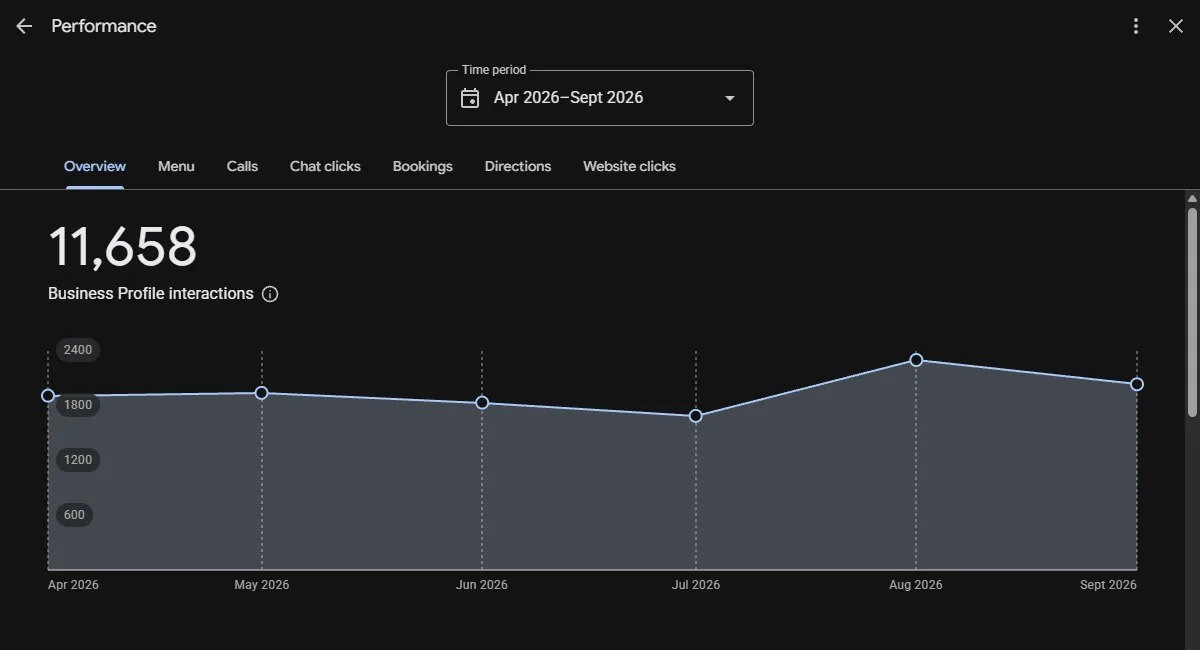
For Rajendra Pav Bhaji, the profile we set up recorded 11,658 interactions between April and September 2026: calls, menu views, direction requests and website clicks. That’s thousands of people deciding to come in, without a single ad.
1. Claim and verify your profile
Search your business name on Google Maps. If a listing exists, claim it. If not, create one at business.google.com. Verification may be by phone, email, video or postcard. Until you’re verified, edits won’t go live.
2. Get the basics exactly right
- Name: your real business name. Don’t stuff keywords into it; that can get the listing suspended.
- Primary category: the most specific one available (“Pav bhaji restaurant” beats “Restaurant” if it exists). Add a few relevant secondary categories.
- Address and pin: check the pin on the map is on your door. If you serve customers at their location, set a service area.
- Phone, website and hours: including holiday hours. Wrong hours lose customers and trust.
Use the same name, address and phone number everywhere: website, Instagram, Justdial, Swiggy, Zomato and IndiaMART. Consistency helps Google trust your listing.
3. Add real photos, and keep adding
Upload your storefront (so people can find you), inside, team, products and menu. Real photos beat stock images every time. Add new ones every month.


4. Fill in everything Google offers
Description, products or services with prices, menu links, booking or order links and attributes like wheelchair access or outdoor seating. Every filled field is another reason to choose you.
5. Ask for reviews, and reply to all of them
Reviews are the strongest trust signal on your profile. Ask happy customers at the counter or with a QR code on the bill. Reply to every review, good or bad, politely and quickly. A calm reply to a bad review often impresses readers more than a perfect score.
6. Post updates
Use posts for offers, new products, festive menus and events. They keep the profile fresh and give searchers something new to read.
7. Read the performance data
Your profile shows how many people called, requested directions, viewed your menu or visited your website. Watch it monthly. Rajendra’s interactions were steady every month and peaked in August, which told us when to push offers.
Quick checklist
- Profile claimed and verified
- Specific primary category
- Correct pin, hours and phone
- Same name, address and phone across the web
- At least 10 real photos, updated monthly
- Products, services or menu added
- Replies to every review
- A post at least every two weeks
FAQ
Is Google Business Profile free?
Yes. Creating and managing a Google Business Profile is free.
How many interactions can a Google Business Profile bring?
It depends on the business and location. Rajendra Pav Bhaji’s profile recorded 11,658 interactions (calls, menu views, directions and website clicks) between April and September 2026.
More from the blog.
 Case story
How a 34-Year-Old Pav Bhaji Brand Reached 357K Views on Instagram and Facebook
A third-generation food business, zero brand identity and a family that doubted Instagram. Here is what changed, and the numbers that proved it.
Read article → Social media
Instagram Reels Ideas for Restaurants and Food Brands
Food is the easiest thing to film and the hardest to make stand out. Fifteen ideas that work, including the heritage Reel that hit 237K views organically.
Read article →Local SEOA Local SEO Checklist for Small Businesses in India
When someone searches "near me", you have seconds to be found. This is the checklist we use for clients, from Google Business Profile to website basics.
Read article →Your vision.
Our mission.
Tell us about your business. We’ll audit where you stand and send a plan with scope and monthly deliverables.